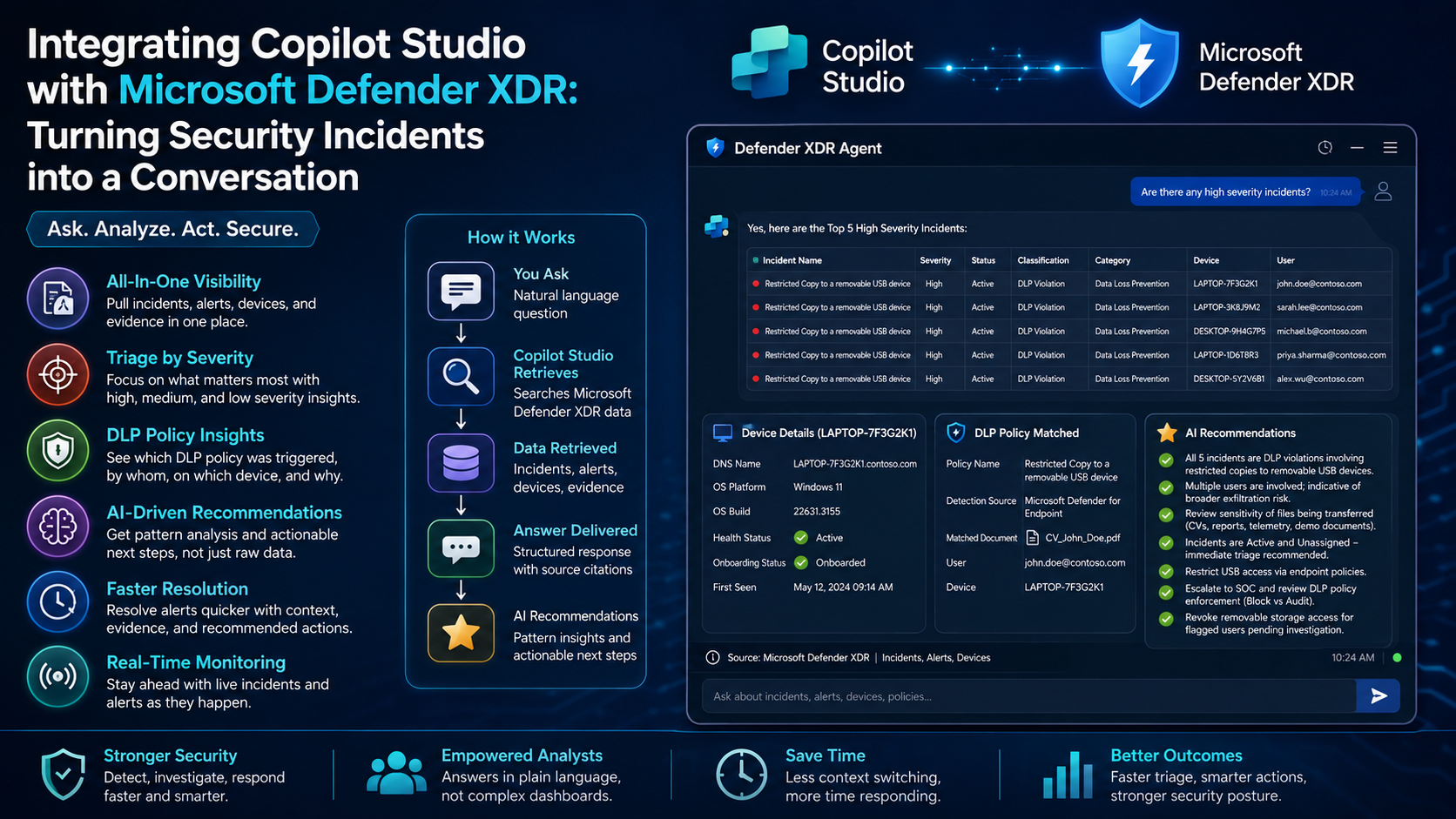
Security teams spend a huge chunk of their day switching between consoles, filtering incident queues, chasing down which device was affected, and manually piecing together whether a data-loss policy actually fired. It works, but it is slow and slow is expensive when a sensitive file is being copied to a USB stick right now.
That is exactly the problem I set out to solve by building a Defender XDR Agent in Microsoft Copilot Studio. Instead of clicking through blades in the Defender portal, an analyst can simply ask "Are there any high severity incidents?" or "Share the incident and related alerts for a specific device" and get a clean, structured, conversational answer with the evidence and next steps attached.
In this post I want to walk through what this integration actually gives you and why it is worth setting up.
What this integration is
At a high level, you connect Microsoft Copilot Studio (the low-code agent-building platform) to Microsoft Defender XDR (the extended detection and response suite that unifies endpoint, identity, email, and data signals). Defender XDR becomes the knowledge and data source; Copilot Studio becomes the natural-language front end that reads incidents, alerts, devices, and evidence, and hands them back to you in plain language.
The result is a chat-based security assistant that sits on top of your real detection data. You do not lose any of Defender's depth you just get a faster, friendlier way to reach it.
The benefits of connecting Copilot Studio to Defender XDR
1. Pull incidents, alerts, devices, and evidence in one place
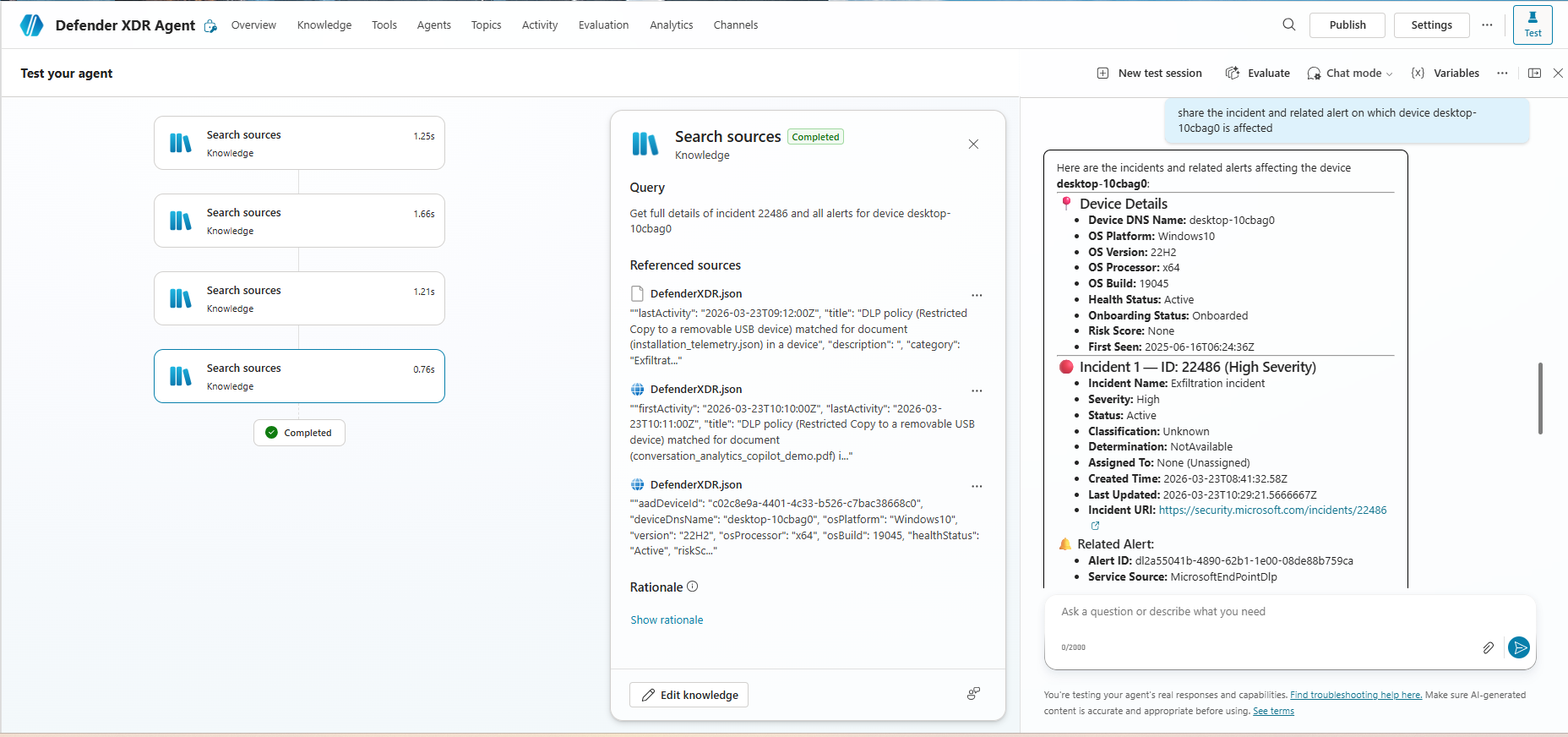
The biggest win is consolidation. In a single query you can ask the agent to "get full details of incident 22486 and all alerts for a device," and it returns everything stitched together the device profile (DNS name, OS platform, OS build, health status, onboarding status, first-seen date), the incident metadata (severity, status, classification, created and last-updated times, incident URI), and the related alerts (alert ID and service source).
No jumping between the incidents view, the device inventory, and the alert timeline. The agent assembles the full picture for you and cites the source records it pulled from.
2. Triage by severity so you target the real problems first
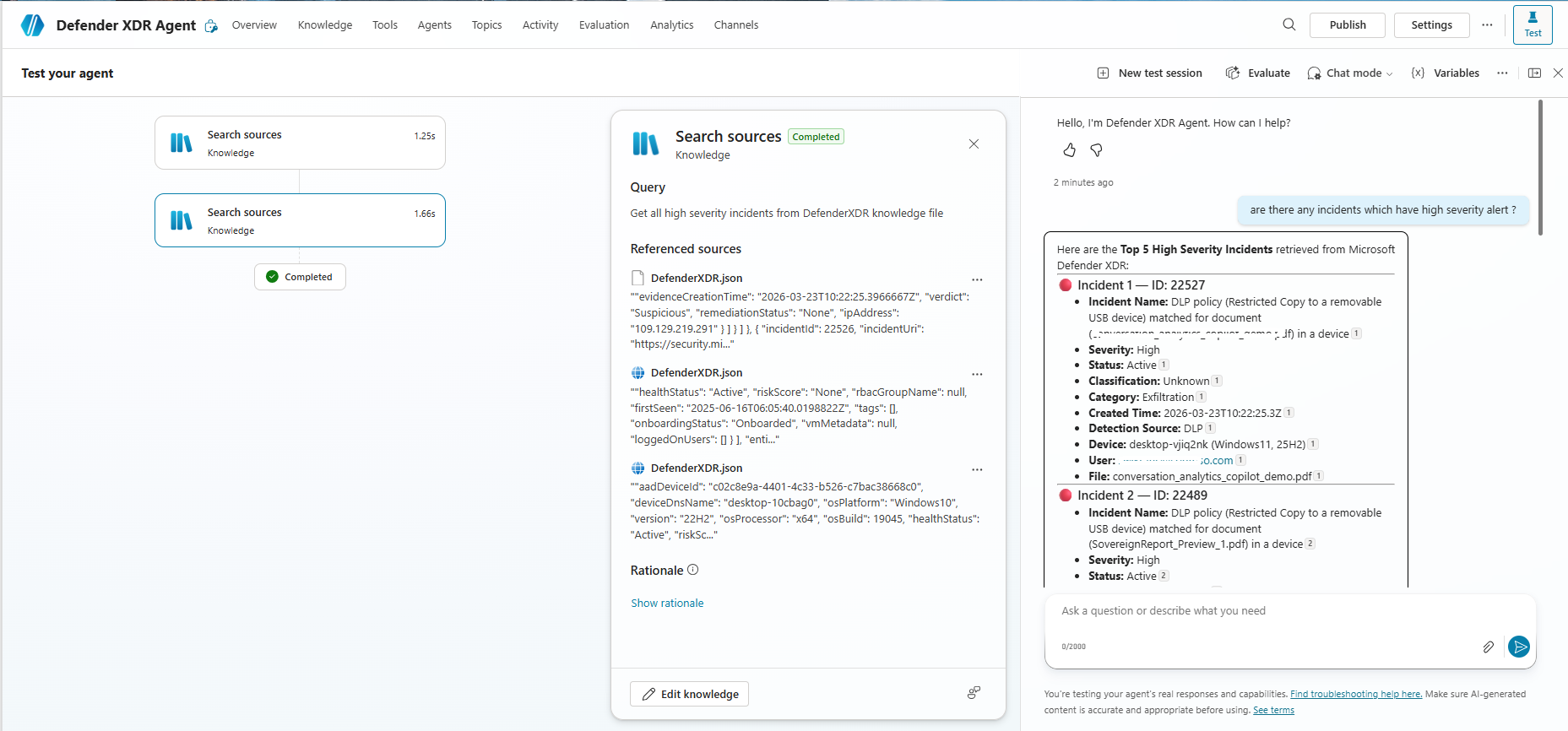
The agent understands severity out of the box. Ask "are there any incidents which have a high severity alert?" and it returns a ranked list for example a Top 5 High Severity Incidents view with each incident's name, severity, status, classification, category, detection source, affected device, user, and the specific file involved.
Because high, medium, and low severity are surfaced clearly, your team can attack the genuinely urgent cases first instead of scrolling through a flat queue. That prioritization is what separates a busy SOC from an effective one.
3. See exactly which DLP policy was triggered in chat
Data Loss Prevention alerts are notoriously noisy and hard to interpret quickly. This integration makes them readable. When a DLP policy such as "Restricted Copy to a removable USB device" fires, the agent shows you the matched document, the policy that caught it, the detection source, and the user and device behind the activity — right in the conversation.
So instead of decoding raw JSON, an analyst sees, in a sentence, that a restricted copy of a sensitive document to a USB device triggered a DLP policy on a specific endpoint. The context that used to take several clicks now arrives as part of the answer.
4. Get AI-driven recommendations, not just raw data
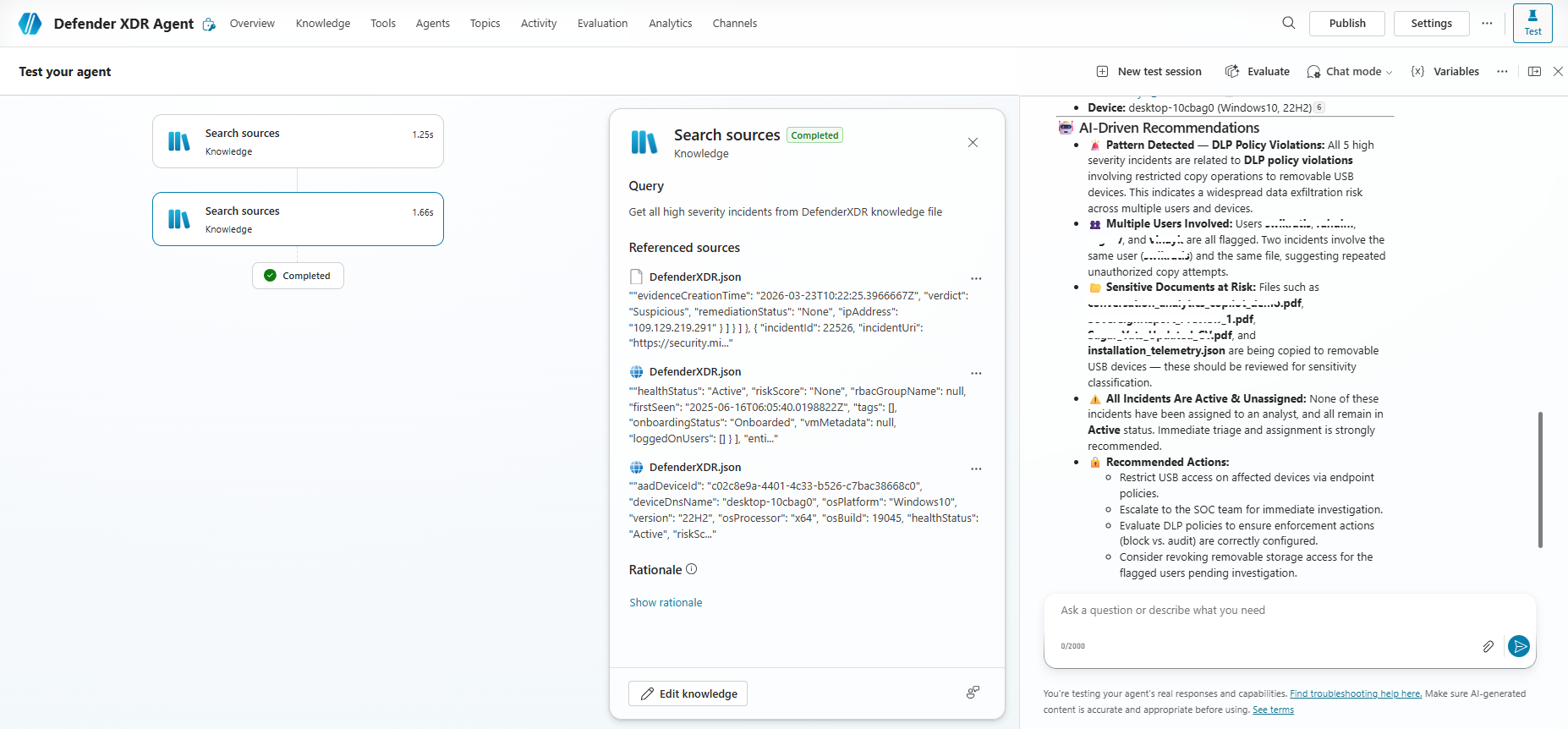
This is where the agent stops being a search box and starts being an assistant. Alongside the facts, it generates AI-driven recommendations that interpret the pattern across incidents:
- Pattern detection: for example, recognizing that all five high-severity incidents relate to DLP violations involving restricted copies to removable USB devices, which points to a broader exfiltration risk rather than five unrelated events.
- User correlation: flagging that multiple users are involved, and noting when the same user and the same file appear repeatedly, which suggests deliberate, repeated attempts rather than a one-off mistake.
- Sensitive documents at risk: calling out the specific files (CVs, preview reports, telemetry, demo documents) being moved to removable storage so they can be reviewed for sensitivity classification.
- Status awareness: highlighting that incidents are still Active and Unassigned, so nothing is quietly sitting untriaged.
- Recommended actions: concrete next steps such as restricting USB access via endpoint policies, escalating to the SOC, reviewing whether DLP is set to block versus audit, and revoking removable-storage access for flagged users pending investigation.
These recommendations are advisory a human analyst still makes the call and performs the remediation but they dramatically shorten the distance between "something happened" and "here is what I should do about it."
5. Resolve alerts faster through a conversational workflow
Because the incident details, affected evidence, and suggested actions all land in the same chat, closing the loop on an alert becomes far quicker. An analyst can understand the scope, confirm the affected device and user, and know the recommended remediation without leaving the conversation. Less context-switching means faster resolution and fewer things falling through the cracks.
6. Keep an eye on things in real time
The agent reads from live Defender XDR data, so the incidents, alerts, and device states it reports reflect what is happening now. That real-time monitoring capability means the moment a new high-severity DLP event appears, it is available to query turning your security posture from a periodic review into an always-on conversation.
How it works in practice
The flow behind the scenes is straightforward:
- You ask a question in natural language about an incident, a device, a severity level, or a policy.
- Copilot Studio searches its Defender XDR knowledge source, retrieving the relevant incident, alert, device, and evidence records.
- The agent composes a structured answer device details, incident metadata, related alerts and cites the underlying source records for transparency.
- AI recommendations are layered on top, summarizing the pattern and suggesting next steps.
From the analyst's side it feels like messaging a knowledgeable colleague who happens to have the entire Defender console memorized.
Why it matters
The value of this integration is not that it replaces Defender XDR it is that it makes Defender XDR reachable for a wider set of people and in a fraction of the time. Faster triage, clearer DLP visibility, severity-based prioritization, real-time awareness, and actionable AI recommendations all add up to a security team that spends less time gathering information and more time actually responding to threats.
By bringing incidents, alerts, devices, evidence, and AI recommendations together in a single conversation, this integration meets analysts where they already work and puts the full weight of Defender's detection data behind every question they ask.